Module 03 · Inventory
The inventory: projects, blocks and lots
How a land developer's inventory is organized in GoSoft: the property catalog by block, each lot's file with measurements, boundaries, registration and price, its statuses, and bulk loading from Excel.
The inventory is the list of everything the company can sell. For a land developer that's hundreds or thousands of lots, each with its size, price and status. If the inventory is wrong, everything else —the site plan, quotes, contracts— comes out wrong.
- Understand how the inventory is organized: project, block and lot.
- Complete a lot's file.
- Read each lot's status.
- Load the whole inventory from Excel.
Project, block and lot
| Level | What it is | Example |
|---|---|---|
| Project | The whole subdivision; it's the business unit | Las Palmas subdivision |
| Block | A group of lots surrounded by streets | Block A |
| Lot | The property that is sold | Lot 01 of block A |
In a building the logic is the same, with floors and apartments; in a memorial park, with sections and plots or niches. Terminology is adjusted in the settings.
The lot's file
| Data | What it's for |
|---|---|
| Code, block and number | Identifying it without doubt |
| Type | Urban land, house, apartment, commercial unit… |
| Area in m² (and in square varas where used) | Basis for price and cost |
| Frontage, depth and boundaries (north, south, east, west) | They go into the contract and the deed |
| Registration and cadastral number | The property's legal identity |
| Price per m² and total price | The list price |
| Location | Its place on the site plan and the satellite map |
| Utilities | Water, power, gas, internet |
A lot's statuses
| Status | Meaning | Can it be sold? |
|---|---|---|
| Available | Free | Yes |
| Reserved | Has an active reservation | No, until the reservation becomes a sale or is released |
| Sold | Has an active or completed contract | No |
| Voided | Removed (for example, because it was split) | No |
The status changes by itself: when a lot is reserved, sold, reversed or voided. No one has to remember to "mark" it.
In GoSoft, step by step
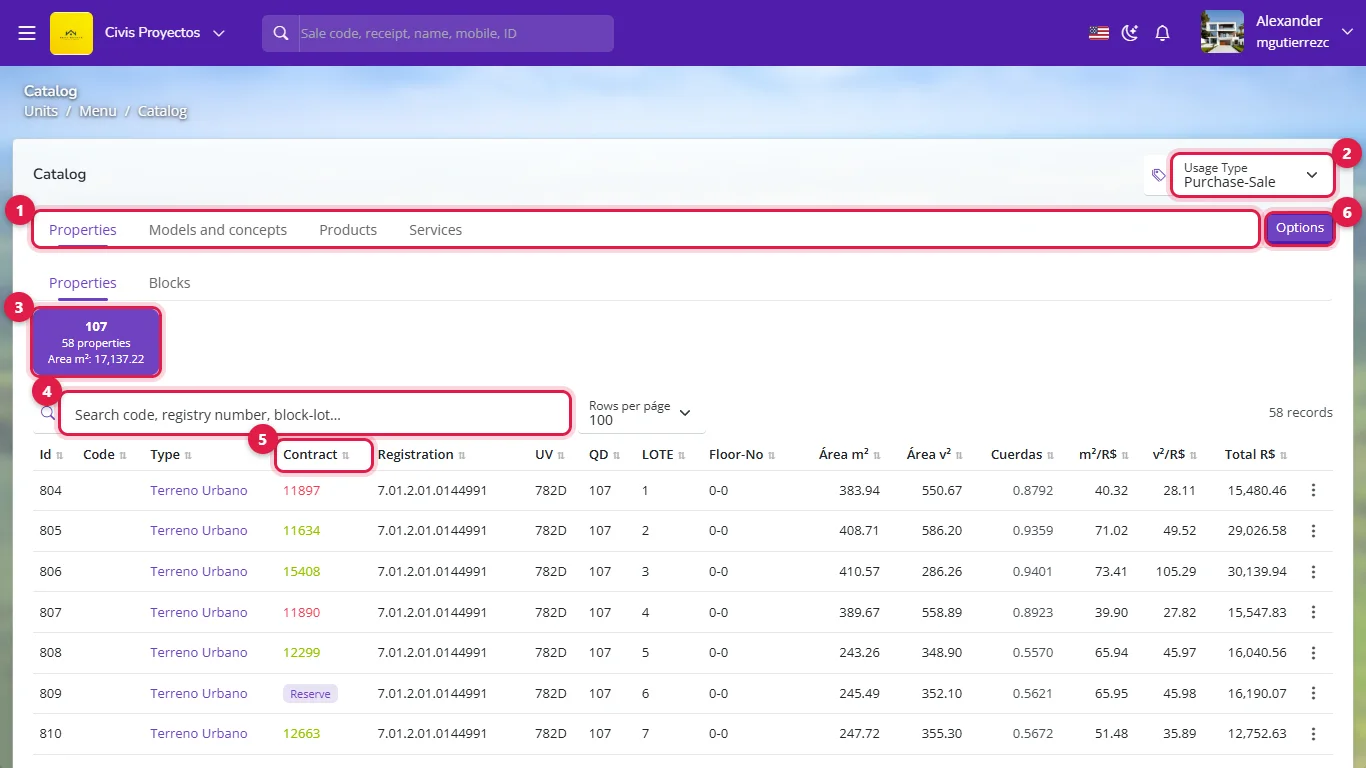
Open Sales contracts → Catalog. Properties are grouped by block; each card shows how many lots it has and its total area.
Property catalog by block Open a lot to see or complete its file: technical data, measurements, boundaries, registration, price and location.
To load many lots at once use Import properties from Excel: download the sample, fill in one row per lot (block, lot, area, price, boundaries, registration…) and upload it.
GoSoft shows a preview: which lots are new, which are updated and which are repeated. Fix what's needed and click Import all.
From the catalog you can also export the inventory to Excel.
A project can't have two lots with the same block and number. The import checks it: repeated rows within the Excel are skipped and it tells you which ones.
- Entering total price and price per m² that don't match the area: pick one and let GoSoft calculate the other.
- Leaving lots already on sale without boundaries or registration: the contract comes out incomplete.
- Creating the same lot twice with different codes.
Self-assessment
What is a block?
A group of lots surrounded by streets.
Who changes a lot's status to Reserved?
GoSoft, by itself, when the reservation is recorded.
The import Excel has two rows with the same block and lot. What happens?
The repeated one is skipped and the preview warns you.