Module 02 · Setting up GoSoft
The company, projects and business units
How to set up a real estate company in GoSoft: company data, country and currency, one business unit per project with its logo, signature and cloud folder, and the real estate development data.
Before loading the first lot, get the house in order: the company data and one project per business unit. It's done once, and it shows on every document you print.
- Complete the company's legal data, country and currency.
- Create one business unit per project, with its logo and signature.
- Connect the cloud folder where documents are stored.
The company
It's the legal entity that sells. Its data appears on contracts, receipts and reports: legal name, tax ID, address, phones, country and currency. The country sets the chart of accounts, taxes and number format; the currency, how amounts are kept (you can also sell in a second currency, such as dollars).
Business units
Each project is a business unit: Las Palmas subdivision, North Condominium, Central Building. Each has:
- Name and abbreviation, shown on documents and reports.
- Logo and signature, for the header of contracts, receipts and presentations.
- Cloud folder (Google Drive or OneDrive) where the project's contracts, deeds and attachments are stored.
- Its own late fee setup (see Sales and late fee settings).
- Development data: project type, total area, parent registration number.
A unit no longer in use can be paused: it stops appearing and takes no new operations, but keeps all its history.
In GoSoft, step by step
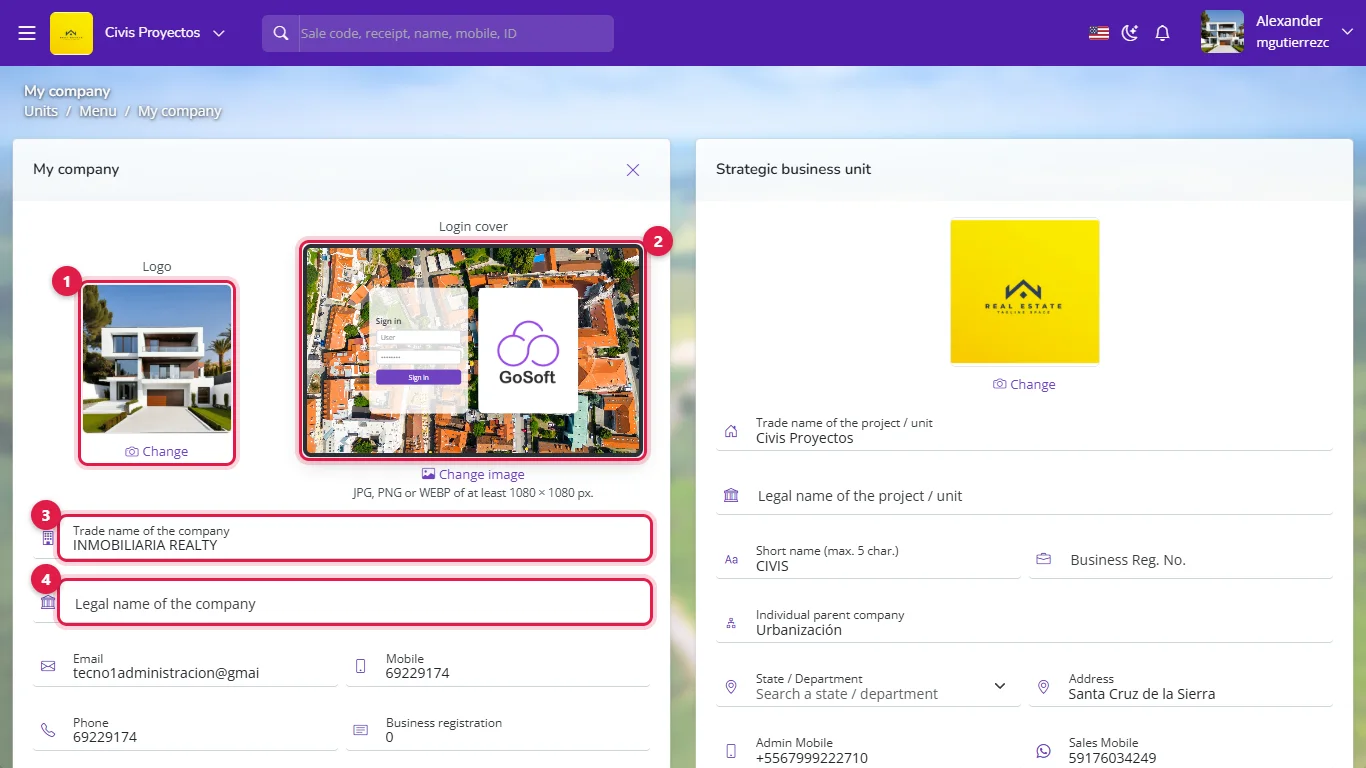
Open My company from the Main strip of the menu. Complete the legal data, country and currency.
My company: legal data, country and business units In the units list, create one per project. On each unit's card, upload the logo, the signature and the cover image.
Connect the unit's cloud folder. Documents you upload from a contract will be stored there, organized.
On the unit's card, Configure late fee defines how delays are charged in that project.
Complete the real estate development data: type, area and parent registration.
Files are stored in your company's Google Drive or OneDrive, not in the system. If one day you stop using GoSoft, your documents are still yours and organized by project.
- Loading all projects into a single unit: later you can't tell how much each one sold or collected.
- Keeping the generic logo: contracts and receipts go out without the company's image.
- Changing the company's country with operations already recorded without reviewing the chart of accounts.
Self-assessment
How many business units should you create for three subdivisions?
Three: one per project.
Where are the documents you upload to a contract stored?
In the cloud folder (Google Drive or OneDrive) connected to the unit.
What happens to a paused unit?
It stops appearing and takes no new operations, but keeps its history.