Module 03 · Inventory
Houses, apartments and construction models
How to sell homes as well as land in GoSoft: construction models with their plan and price, add-on items, apartments by floor, construction stages and how they add up to the contract price.
Many land developers sell the lot with the house: the customer picks the land and one of several home models. Others sell apartments in a building. GoSoft handles both with the same logic: an inventory, a price and a contract.
- Create a construction model with its plan and price.
- Add the model and the add-ons to the lot's price.
- Record a sale's construction stages.
Construction models
A model is a type of home that repeats: House Type A, 2 bedrooms, 65 m². It has:
- Name, description and the description that goes into the contract.
- Built area and rooms (bedrooms, bathrooms, garages).
- Architectural plan as PDF and image.
- Price, fixed or calculated as a percentage of the lot's price.
Example
| Item | Amount |
|---|---|
| Lot 05, block B (200 m²) | 60,000,000 |
| House Type A | 120,000,000 |
| Add-on: boundary wall (20 linear meters) | 6,000,000 |
| Contract total | 186,000,000 |
Add-on items
These are things added to the sale that add to the price: a wall, a garage, special finishes. Each item has its unit of measure (unit, linear meter, m²), its price and whether it counts toward the salesperson's commission.
Apartments
In a building, the inventory is organized by floors. Each apartment has its private area, common area, rooms and price. The building's plan shows the apartments floor by floor.
Construction stages
When a home is sold, the contract file has the Construction tab: the construction stages (foundations, structure, roof, finishes) are recorded there with their date and status, and the construction timeline shows progress. It helps keep the customer informed and coordinate the handover.
In GoSoft, step by step
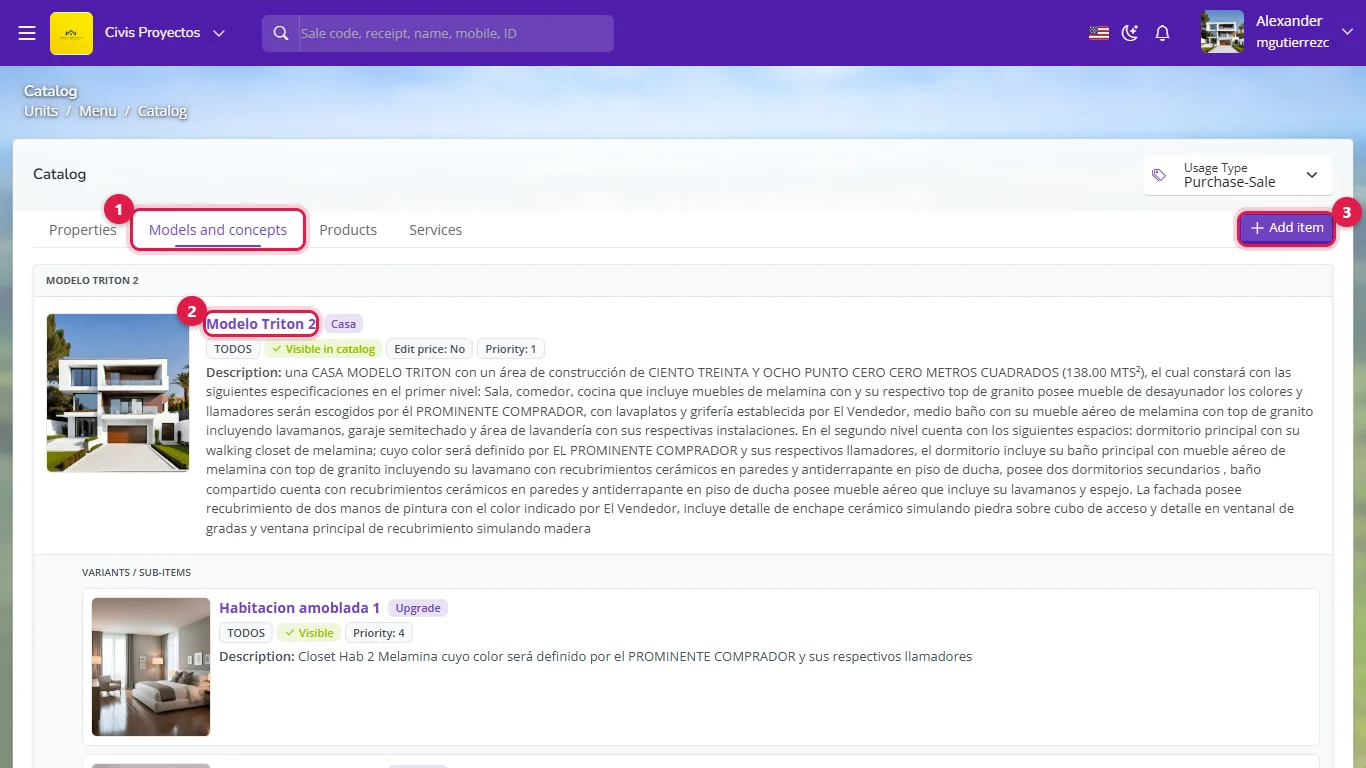
Create the project's construction models with their description, area, rooms, price and PDF plan.
Construction model with its plan and price When selling, add the chosen model and the add-on items to the contract: GoSoft adds up land and construction in the total.
In the contract file, Construction tab, record each stage as the works progress.
The Sales by model report shows how many houses of each type were sold. It helps decide which models to repeat in the project's next phase.
Self-assessment
A lot costs 50,000,000, the house 110,000,000 and an add-on 4,000,000. What is the contract total?
164,000,000.
Where are a sale's construction stages recorded?
In the Construction tab of the contract file.
Why mark whether an add-on counts toward the commission?
To decide whether the salesperson also earns commission on that add-on.